Ayobami Akinwolade — Salesforce CRM Consultant
ABOUT ME
Who I Am & What I Offer

Salesforce Consultant || CRM Operations Specialist
I’m Ayobami, a business systems consultant who helps companies gain control over their sales, customers, and daily operations.
Many businesses don’t struggle because they lack customers or effort. They struggle because things are happening but nothing is structured. With a backgroung in a sales and marketing, I understand how CRM can be used as a control system to bring order in a company
My work focuses on turning manual, scattered processes into clear systems where:
Every customer is tracked
Every follow-up is visible
Sales performance is measurable
Management has clarity without chasing staff
This mindset led me to design a full end-to-end Sales & Customer Control System for a real estate business built to reflect how businesses actually operate, not how software manuals describe them. I enjoy diagnosing messy operations, fixing broken workflows, and creating systems that help teams work with confidence instead of stress. I’m currently open to roles, collaborations, and projects where businesses want structure, visibility, and growth

Sales & Customer Control System for a Real Estate Business
The Problem
In Bahrain’s most real estate market, sales don't fail due to lack of interest; they fail due to systematic follow up. Most real estate struggles either messy lead. deals stuck in pipeline, or agent payout commission struggle. For example; Leads come in from Property Finder, Instagram, and WhatsApp, but get lost in an agent's personal chat history. Without a system also, high-value prospects are forgotten after the first viewing. I created a CRM system for this real estate company that showcases how leads are being managed, deals are tracked and automated calculations for agents, and company splits to ensure trust within the team.
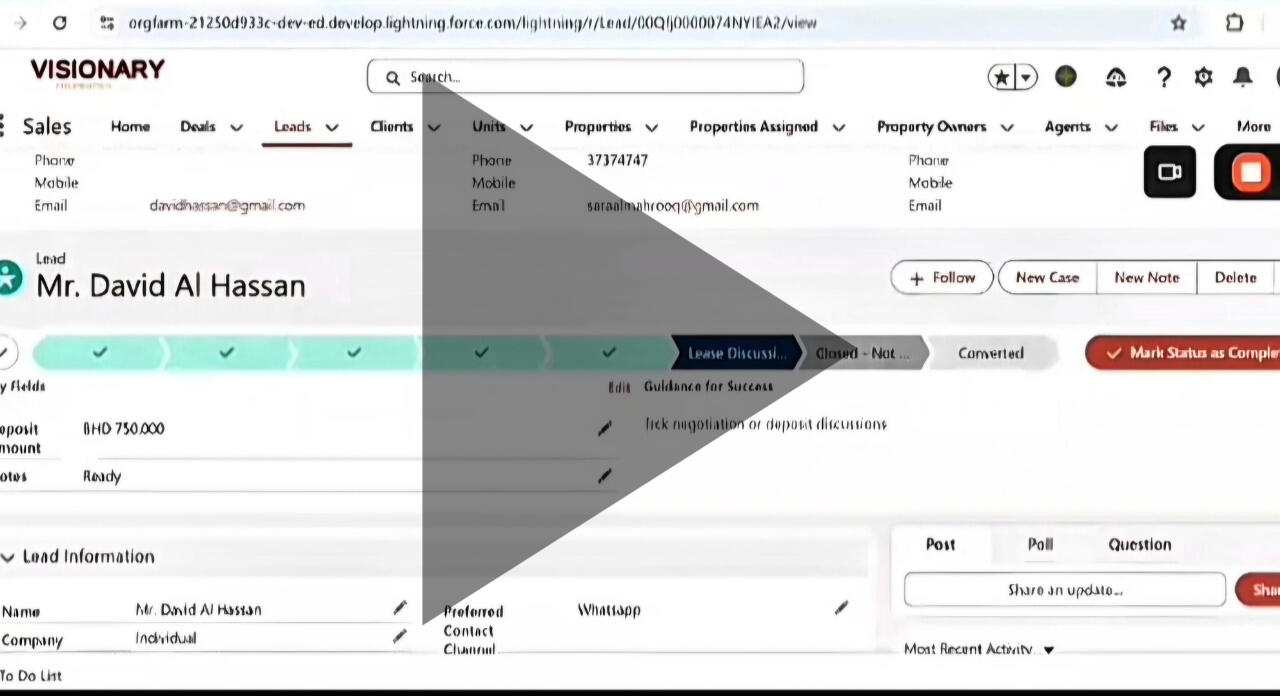
The walkthrough below shows how this system brings structure to the sales process, from the first enquiry, to deal closure, to commission calculation. Watch the walkthrough to see how sales, deals, and commissions are controlled in one place.
Case Studies & Real Business Scenarios
Lead Management and Qualification
The Problem
In this real estate operation, leads were coming in but they were not being handled in a structured way. Enquiries arrived from different sources, but key information was often missing.
There was no clear qualification process, and response time depended on manual effort.
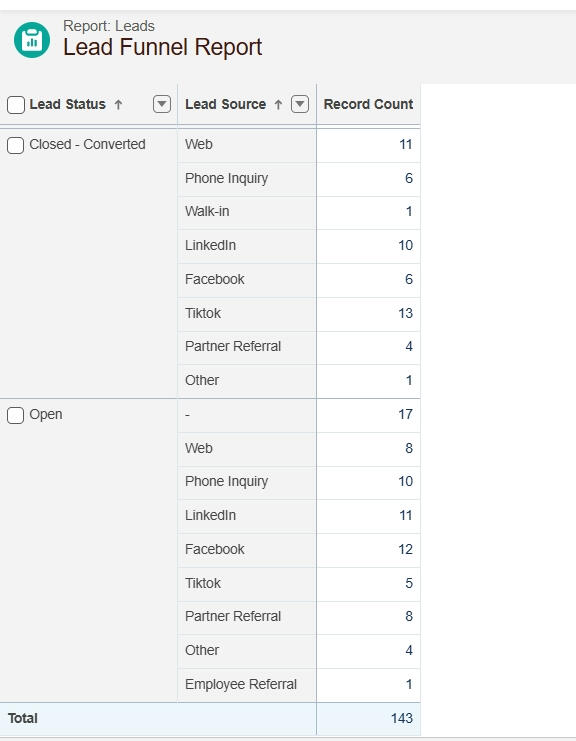
As a result; Follow-ups were inconsistent, Leads were delayed or forgotten, Management had no clear visibility into lead volume, quality, or response behavior
Agents were not involved at the lead stage, so delays and gaps at the sales team level affected the entire downstream process including property matching.
This system introduces structure at the very first point of contact. Every lead is captured in one place, required information is completed before progression, duplicates are controlled, and leads move through a clear qualification path. Sales teams respond faster, agents work with cleaner data, and managers can see what is happening without chasing updates.
The Root Cause
No clean or guided intake process for the sales team
No automation to ensure fast acknowledgment or routing
No defined qualification steps
Missing critical fields because users could skip them
Lead pages were cluttered, confusing, and inconsistent
This resulted In
Slow initial response
Bad or incomplete data
Poor handoff to agents
Reduced efficiency during the property-matching phase
What I built (Solution I provided)
Clean & Optimized Lead Intake for the Sales Team
I redesigned the Lead object so the sales team only sees the fields that matter. This Includes:
Cleaner page layout
Dynamic field visibility
Organized sections
Removal of clutter and unnecessary fields

Rental Lead Type showing only Relevant fields

Buyer lead type showing only relevant fields


This makes lead creation fast, accurate, and consistent.
Automated Lead Assignment & Instant Auto-Responses
To remove delays and improve professionalism:
Lead Assignment Rules: This Automatically route leads to the correct sales rep
Auto-Response Rules: This instantly send email acknowledgment to new leads
This ensures immediate engagement before any agent is involved.

Lead Autoresponse Rule

Lead Assignment Rule to the Lead Owner


Defined Qualification Flow Using Path & Validation Rules
To also prevent missing data and ensure consistent qualification:
I built a Salesforce Path to guide the sales team through each stage
I used validation rules to make some key fields mandatory, to ensure users don't skip relevant information
I created a clear process for when a lead is ready for handoff to the agent stage

Validation Rule to prevent users from closing a lead without a Reason

Validation in check, Lead Path defined with its key fields


Data Management & Duplicate Prevention
To maintain clean and reliable lead data, I implemented data management controls to prevent duplicate records and enforce consistency at the point of entry. This Include;
Duplicate rules to identify and block duplicate lead records
Standardized key fields to improve matching accuracy
Clear system feedback to guide users when a duplicate is detected

Duplicate rule enforcement prevents the creation of duplicate lead records, ensuring clean and accurate CRM data from the point of entry.

These controls ensure data integrity, reduce reporting errors, and prevent downstream issues during lead qualification and conversion.
Tools Used
Lead Assignment Rules
Auto-Response Rules
Validation Rules
Data Loader
Salesforce Path
Dynamic Forms
Page Layouts
List Views
Business Impact
Faster follow-up from the sales team
Cleaner, more complete lead records
More accurate qualification
Smooth handoff to agents for property matching
Better visibility for management
Report
Agent Management and Productivity
The Problem
The agency had no structured way to track which agent was responsible for a property, how many properties they managed, or what performance looked like. Commission payouts were also risky because the company had no control system to ensure an agent only got paid when a deal was officially closed. This resulted in:
Overpayment risks
Disputes
Lack of accountability
Zero visibility into agent performance
The business clearly needed a controlled, transparent system that tied commissions to real results.
The Root Cause
Salesforce has no native way to connect agents to multiple properties in a scalable way.
No central point to track an agent’s property load.
No mechanism ensuring commission = closed deal, not just property assignment.
No performance reporting (deals handled, deals won, revenue generated).
This meant management was operating blindly and could easily lose money.

Agent Commission calculated at the junction object level

Solution I created
Agent–Property Relationship via a Junction Object
To properly manage assignments, I created a junction object called Property Assignment that allows:
One agent to manage multiple properties
One property to be handled by multiple agents (if needed)
Related lists showing exactly who manages what
Ensures property assigned only manages agent and not track commissions

Related list of property assigned to an agent

Total properties Agent is assigned to

Property Assigned only holds Agent information


This replaced guesswork with clear relationship mapping.
Performance Tracking Using Roll-Up Summaries
I used DLRS (Declarative Lookup Rollup Summaries) to provide automatic insights:
Total number of properties an agent manages
Number of deals linked to the agent
Total closed-won deals
Total commission earned
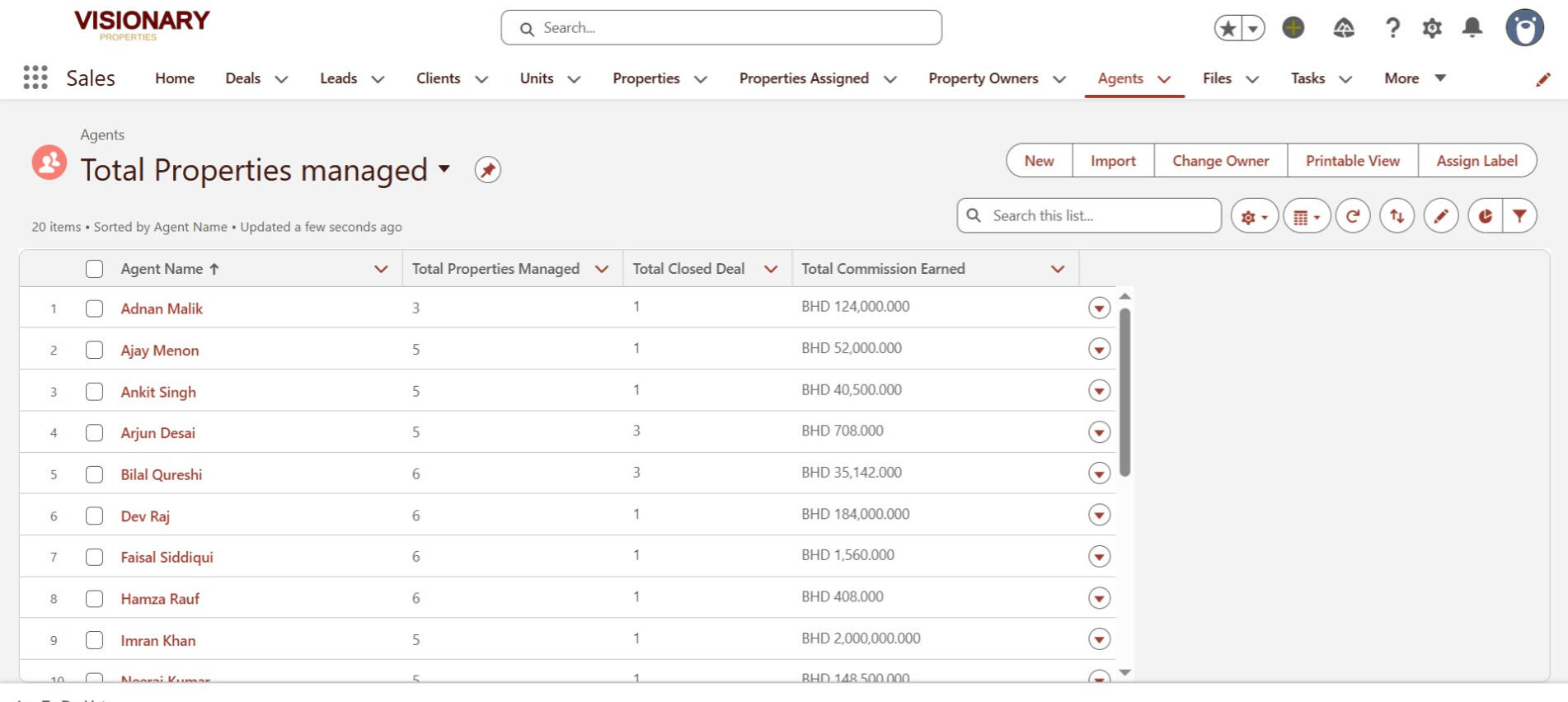
Now the company can instantly see which agents perform and who needs coaching.
Commission Control Logic (Pay Only on Closed Deals)
To eliminate commission leakage, I implemented:
Commission formulas at the Deal (Opportunity) level
Commission only triggers at Negotiation Stage
No commission calculation on assigned properties
No manual entry = no manipulation

Commission

Commission at deal level

Result


This ensures:
Agents don’t get paid for “trying.”
They get paid ONLY when they close real deals. This is how companies protect revenue.
Tools Used
Junction Object (Property Assignment)
DLRS (Declarative Lookup Rollup Summaries)
Opportunity Commission Formula
Validation Logic (prevent premature payout)
List Views for agent productivity
Lightning Page Optimization
Business Impact
Zero commission errors
Transparent performance tracking
Clear ownership of properties
Agents now accountable for actual results
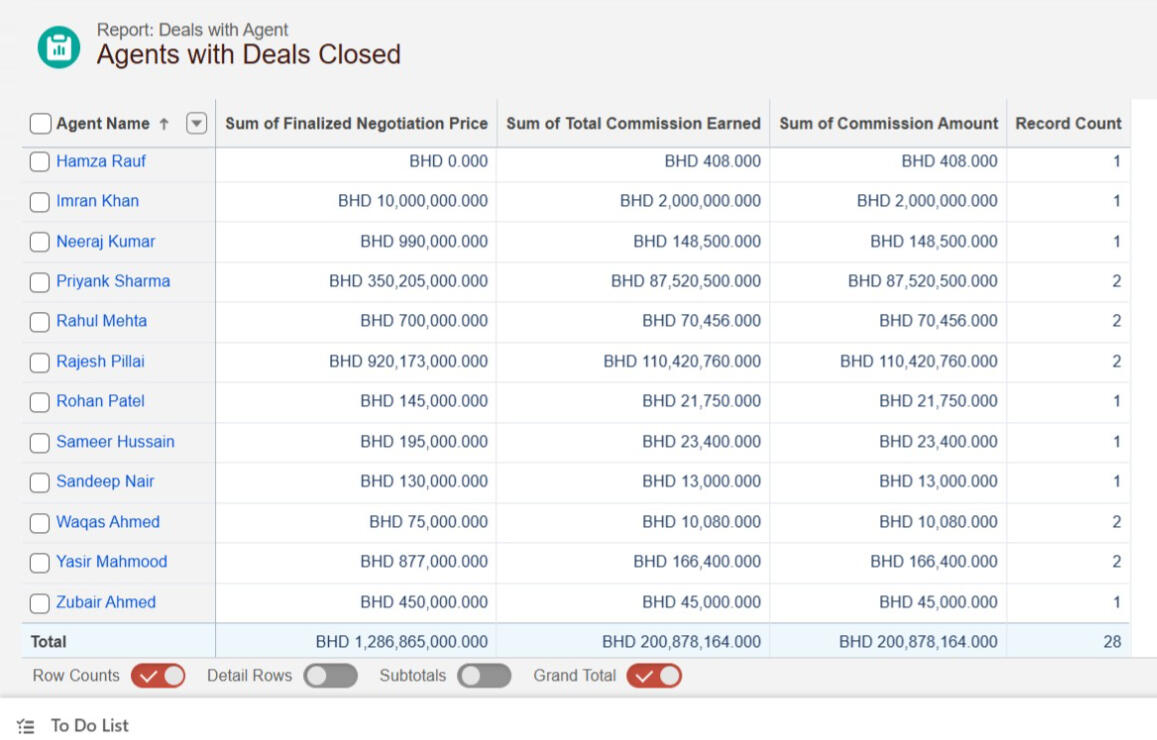
Management can see who is driving revenue and who is not
Report
Property & Unit Inventory Management System
The Problem
This company had no centralized, reliable system to track properties, units, and their availability status.
Everything was scattered spreadsheets, manual notes, calls, memory.
This caused:
Double-booking risks
Agents recommending unavailable properties
Poor visibility into available vs. occupied units
Difficulty identifying property types and classifications
Management having NO real-time inventory insight
In a real estate business, this lack of structure directly slows down sales and frustrates clients.
The Root Cause
No proper data model for property → unit relationships
No clear separation of property types (Building, Apartment, Land, Office, etc.)
No automated way to calculate how many units were available or occupied
No standardized fields for important property attributes
No reporting structure to analyze inventory
The business needed a structured, scalable system to manage property inventory properly.
What I Built
A Scalable Data Model for Real Estate Inventory
I architected a structured and scalable data model that mirrors how real estate businesses operate in real life. Instead of forcing everything into a single object, I separated Property and Unit into two purpose-built custom objects, giving the business clarity, flexibility, and room to grow.
Property : Holds all high-level information about a real estate asset.To keep the system clean and relevant, I used Record Types to distinguish between different kinds of assets which are:
Building
Apartment
Office
Land

Rental Property Record Type

Building Property Record Type


Each record type displays only the fields that matter, reducing clutter and improving data quality. Key property-level fields include:
Property Type
Total Units (automatically rolled up)
Address & Location Details
Property Owner (Account Relationship)
Operational Status: Active, Inactive, Under Renovation

Apartment Record Page

Office property Record Page

Building Property Record Page

Land property Record Page


Unit Object: Designed to capture the granular details of each rentable or sellable unit within a property. Each unit includes:
Unit Type (Studio, 1BR, Office Space, etc.)
Rent Amount / Sale Price
Availability Status: Available, Occupied, Reserved
Bedroom/Bathroom Count
Floor Number
Linked Property (creating the parent→child relationship

Apartment Unit

Office Unit


Why this Matters
This model forms a clean one-to-many relationship, where one property can contain multiple units.
It allows the business to:
Track occupancy accurately
Avoid double-booking
Analyze inventory by type, location, and availability
Scale as more properties and units are added
It’s the foundation that makes the entire CRM stable, intuitive, and future-proof.
Real-Time Visibility Using Roll-Up Summaries (DLRS)
I used DLRS to automatically calculate:
Total Units Per Property
Available Units
Occupied Units
This gives management instant insights without manual counting.
Clean User Interface for Agents & Sales Team
I optimized the Lightning page layouts so that users can quickly see:
Property details
Unit lists
Availability status
Key metrics at a glance
This reduces search time and improves accuracy during property recommendations.
Structured Property Classification System
To avoid confusion and improve filtering, I used:
Record types
Field-level visibility
Field dependency
Page layouts customized by property type
For example:
A Land record type doesn’t show fields relevant only to Buildings.
When a property type is also selected, it only brings the values associated with that property typeThis keeps the system clean and intuitive.
Tools Used
Custom Objects (Property, Unit)
Record Types
Page Layouts
DLRS (Roll-up summaries)
List Views
Related Lists
Picklists for property classification
Lightning Page Optimization
Business Impact
Zero double-booking of units
Agents now recommend only available properties
Faster client matching
Clean visibility into inventory
Management can see property occupancy in real time
Clean data model that scales as more properties are added
This case study proves you can design operational systems, not just add fields.
Supporting Report

Report of Unit Status

Most Occupied Units

Most sold building property type

Rental Properties Revenue


Skills and Expertise
Technical Skills
Salesforce CRM Configuration
Custom Objects, Fields & Record Types
Data Modeling & Relationship Design
Automation (Validation Rules, Assignment Logic)
Reporting & Dashboard Creation
Lead, Opportunity & Deal Lifecycle Management
Data Import & Export (Data Loader, Import Wizard)
Bulk Data Operations (Mass Update, Mass Delete, Mass Upload)
Data Cleaning, Standardization & Field Mapping
Duplicate Prevention & Data Quality Assurance
Non-Technical Skills
Business Process Analysis
Sales & Marketing Understanding
Customer Journey Mapping
Problem-Solving & Systems Thinking
Communication & Requirements Gathering
Stakeholder Collaboration
Critical Thinking & Decision Support
Documentation & Training
Project Organization & Attention to Detail
Continuous Improvement Mindset
Tools I used
Salesforce
Data Loader
Google Sheets / Excel
Report Builder
Notion / Documentation Tools
Services
How I Support Businesses
I occasionally take on small, high-impact freelance projects for businesses that need clarity, structure, and better customer workflows.
My goal is simple: help teams work smarter, not harder.
CRM Setup & Optimization
Salesforce configuration
Custom objects & data model design
Lead, deal & pipeline structure
Record types, automation & validation rules
Process Improvement & Automation
Mapping business workflows
Designing automations with Flow
Eliminating manual work
Improving team productivity
Reporting & Business Insights
Dashboards for managers & owners
Performance tracking (agents, sales, operations)
Data visibility for decision-making
Data Management & Cleanup
Data import/export (Data Loader, Import Wizard)
Data cleaning & standardization
Duplicate prevention & quality checks
CRM Training for Staff & Teams
How to navigate custom CRM setups
How to manage leads, deals, tenants, and records
Best practices for clean data entry
Understanding workflow stages & automation
How to read dashboards & reports
Tailored training sessions for sales, ops, and admin teams
If your business needs help improving your CRM or streamlining a process, I’m open to short-term collaborations where I can add real value.